


Ai Chatbot - Talk to Ai Bot
4.2172.00 Reviews
App Specs
- Version
- 1.4.8
- Updated On
- License
- Free
- Downloads
- 1,000,000+
- Developer
- Card Scanner
- Categories
- Productivity
- Platform
- Android
Screenshots
 Analysis by AppCompare
I reach for an AI chat app when I want help getting started on a task, a quick explanation, or a bit of low-effort conversation. Ai Chatbot - Talk to Ai Bot is a free productivity app built around that kind of interaction, with image generation and homework help among its intended uses. It can be useful as a flexible starting point, but I would treat its replies as suggestions to check rather than answers to trust automatically.
What the free offer means in practice
The app is free to download, while in-app purchases range from $3.99 to $99.99 per item. That makes it possible to try the basic experience before deciding whether paid options are worth considering. The wide range is a reason to look carefully at the purchase details in the app before spending: the figures alone do not tell me what each item includes or whether it suits the way you plan to use the chatbot.
For a casual user, free access may be enough to see whether chatting, asking for help, or trying an image prompt fits into daily life. If you expect to use it often, I would first identify the specific task you want it to improve, then judge any paid option against that need rather than assuming that paying automatically makes the answers better or more reliable.
Where a chatbot can save effort
The clearest value here is convenience: one place to ask for a plain-language explanation, explore an idea, or get a first draft of a plan. I find chat most useful when I already know what I am trying to do but need help breaking the blank-page problem. For example, you could ask for a few dinner ideas based on ingredients you have, then check the suggestions against your dietary needs and what is actually in your kitchen.
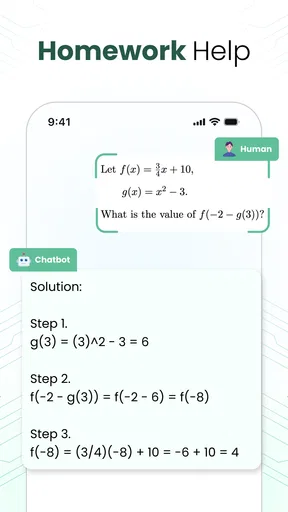
Homework help can be useful in a similar way when you ask for an explanation of a method or request a small hint, rather than simply copying a finished answer. A good follow-up is to ask the bot to explain the reasoning in simpler steps, then solve the problem yourself. That turns the exchange into a study aid; it does not make the chatbot a substitute for your teacher, course materials, or your own verification.
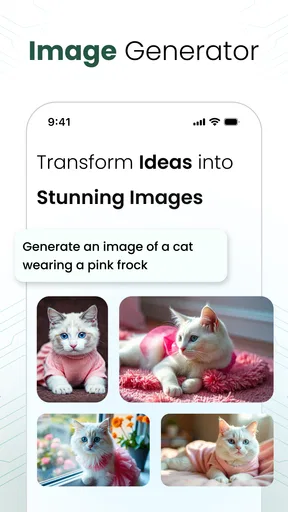
Image generation offers a different kind of value. I would use it to explore visual directions or make a rough concept to react to, not as a guaranteed way to produce a polished, exact result. Clear prompts help: describe the subject, mood, and details that matter, and change one element at a time if the first attempt misses the mark. That makes it easier to tell whether the tool is useful for your purpose.
Getting Acquainted with Ai Chatbot
First things first, let's talk about the setup. Installing Ai Chatbot - Talk to Ai Bot is a breeze. Just a couple of taps and you're ready to dive into a world of virtual conversation. The app's interface is clean and intuitive, making it easy for anyone to jump right in without a steep learning curve.
Worth Reading Before You Choose

EA SPORTS FC Mobile 26 Is a Bigger Football Game, but It Takes Time

Flipboard Shows What News Apps Must Do Beyond the Feed

Switching to Android Auto Means Rethinking Your Driving Routine

Google Calendar Makes a Crowded Week Easier to Manage

Ludo King Makes the Most of the Minutes Between Plans

Baby Panda World Brings Quick Play to Modern Phones, but Its Game Library Feels Busy
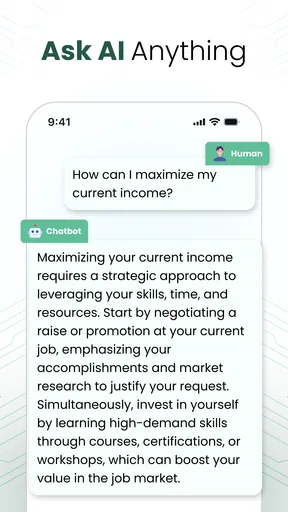
Once you're in, you'll notice the chatbot's prompt greeting, ready to engage with you on a multitude of topics. Whether you want to discuss the latest news, get advice on a tricky situation, or just have a friendly chat, this app has got you covered. It’s like having a friend in your pocket, ready to chat whenever you are.
Features That Stand Out
Now, let's get into the nitty-gritty of the features. One of the standout elements of Ai Chatbot - Talk to Ai Bot is its ability to adapt to your conversational style. The more you chat, the more it learns about your preferences, making the interaction smoother and more personalized over time.
Another cool feature is the app's versatility. It's not just about casual conversation—if you're in the mood for something more structured, you can dive into trivia games, quizzes, or even language learning. It's like having a Swiss Army knife of apps, all packed into one.
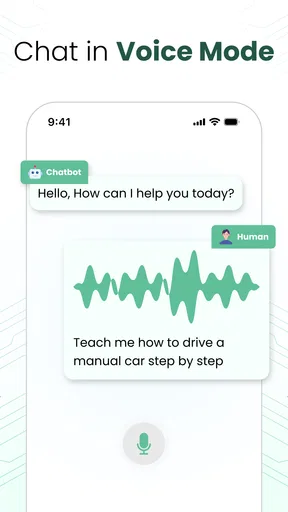
Oh, and did I mention the voice interaction? If you're not in the mood to type, you can talk to the bot using your voice. This feature is especially handy when you're multitasking or just too lazy to type out full sentences. It's like having a personal assistant at your beck and call.
Choosing when to trust a reply
For practical questions, I would use the chatbot to generate options, not to make the final decision for me. If it suggests a recipe, check ingredients and cooking instructions. If it explains a school topic, compare the method with your class notes. If you ask about a current event or something consequential, verify it with a reliable source before acting. A fluent answer can still be mistaken, incomplete, or out of date.
There is also a useful prompt-writing trade-off: broad questions are quick, but they tend to produce broad answers. A little context usually helps. Instead of asking for “a study plan,” mention the subject, the time you have, and what you find difficult. Avoid sharing private details that are not needed to get help; you can describe a situation in general terms and still receive a useful outline.
How it fits alongside other tools
Compared with a conventional web search, a chatbot can be more convenient when you want an explanation in conversational language or want to refine an idea through follow-up questions. Search is usually the better choice when you need to inspect sources, check a specific fact, or compare authoritative information. I would use the chatbot to shape the question and search to confirm important answers, rather than treating either approach as a replacement for the other.
It also differs from a dedicated study app or image editor. A broad chatbot may help you brainstorm across several kinds of tasks, while a specialist tool can be a better fit when you need a structured course, precise editing controls, or a dependable workflow built for one job. The convenience of having different kinds of assistance together is appealing, but it does not mean every task will be handled as deeply as it would be in a purpose-built app.
Real-World Applications
So, how does Ai Chatbot - Talk to Ai Bot fit into your daily life? Well, think of those moments when you're waiting for a friend, commuting, or just lounging at home. Instead of mindlessly scrolling through social media, you can engage with the chatbot to keep your brain active and entertained.
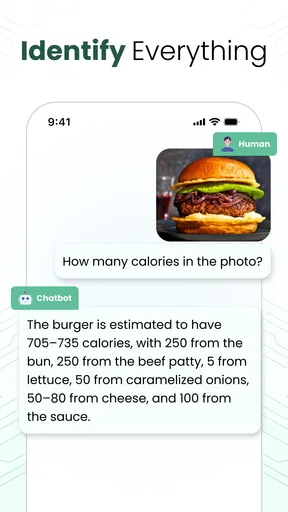
Plus, the app can be surprisingly helpful for brainstorming ideas or getting quick information. Whether you need a recipe for dinner or some quick facts for a project, the chatbot is there to lend a helping hand.
A practical routine for everyday use
Picture a busy evening: you have a few ingredients left, a project to plan, and only a short break before getting back to work. I would ask for several meal ideas, choose one that fits, and check the recipe rather than relying on the first answer unquestioningly. Later, I might use the chatbot to turn a rough project idea into a short outline, then edit that outline myself. These are modest jobs, but they show where a conversational assistant can reduce friction without taking over the decisions.
A useful habit is to keep each request focused. If an answer is too general, add one constraint or ask one follow-up instead of restarting with a long, tangled prompt. For image generation, make the goal clear before adding decorative details. For study help, request an explanation and then test your understanding independently. These small choices make the interaction easier to evaluate and reduce the temptation to accept an answer simply because it sounds confident.
The User Experience
One thing I really appreciate about Ai Chatbot - Talk to Ai Bot is its user-friendly design. The developers have clearly put a lot of thought into making the app accessible to everyone. The text is easy to read, the colors are pleasant, and the overall layout feels intuitive.
The app also performs smoothly without any noticeable lag, which is crucial for maintaining a seamless conversation. And if you're worried about privacy, the app promises to keep your data secure, which is always a plus in my book.
Who is likely to get the most from it?
I can see this being a good fit for someone who wants an approachable place to try conversational AI for everyday brainstorming, casual questions, or a first pass at homework explanations. It may also suit people who enjoy exploring image prompts without needing a dedicated creative workflow. The app is rated for Everyone, and it has an average rating of 4.2 from around 66,000 ratings, which suggests broad interest while still leaving room for individual experiences to differ.
I would skip it if you need guaranteed factual accuracy, specialist professional advice, or a carefully structured learning programme. It is also not the right choice if your main aim is to verify claims from primary sources; a search engine or trusted reference is better for that. Before using any chatbot for sensitive matters, keep your prompts general and avoid entering information you would not want included in an online service.
Availability and expectations
Card Scanner develops the app, which is listed as a productivity tool. It was released on January 27, 2025, and version 1.4.8 requires Android 6.0 or later. It has more than one million installs. Those details make it easy to gauge whether it fits an Android device, while the free download lets a curious user try it without paying upfront. The purchase range still deserves a careful look if you decide to explore paid items.
One practical question is whether it can replace a dedicated assistant or research tool. I would not make that assumption. Its appeal is the conversational format and mix of intended uses, but the best tool depends on the task: use a specialist app for precision and a source-based search when evidence matters. Another question is whether it is worth paying for; my answer is to try the free access first and only consider an in-app purchase if the specific paid option clearly addresses a recurring need.
Final Thoughts
All in all, Ai Chatbot - Talk to Ai Bot is a delightful app that offers more than just a simple chat. With its adaptive learning, diverse features, and user-friendly design, it’s a great companion for anyone looking to spice up their day with a little conversation.
Whether you're looking for a virtual friend, a trivia buddy, or just a quick source of information, this app might just become your new favorite. So why not give it a try and see if it becomes a staple on your home screen?
My recommendation is to start with a small, low-stakes task and judge the result for yourself. If the app helps you move from a vague question to a useful next step, its free access may be enough to earn a place in your routine. If you need dependable research, a specialist feature, or clearly defined paid value, choose a tool built around that need instead. I would treat this chatbot as a convenient helper, not an authority—and that is where I think it makes the most sense.
Pros
- User-friendly interface for easy navigation.
- Supports multiple languages seamlessly.
- Fast response time with minimal lag.
- Customizable settings to suit user preferences.
- Integrates with other apps for multitasking.
Cons
- Limited offline functionality available.
- Occasional inaccuracies in responses.
- Requires a stable internet connection.
- Premium features locked behind a paywall.
- Minimal voice command capabilities.
FAQs for Ai Chatbot - Talk to Ai Bot
What features does the AI Chatbot offer?
The AI Chatbot offers a range of features designed to enhance user interaction, including natural language processing, personalized responses, and multi-language support. It can assist with general inquiries, provide recommendations, and even learn from previous interactions to improve future responses. This makes it a versatile tool for both casual and professional use.
Is the AI Chatbot secure and private?
Yes, the AI Chatbot prioritizes user privacy and data security. It employs encryption protocols to protect user data during transmission and storage. Additionally, the bot does not retain personal information unless explicitly agreed upon by the user. Always review the app's privacy policy to understand how your data is managed.
Can I customize the AI Chatbot's responses?
While the AI Chatbot is designed to adapt and learn from user interactions, direct customization of its responses may be limited. However, users can provide feedback on responses to help the bot improve its accuracy and relevance over time. Some versions offer settings adjustments to better align with user preferences.
How does the AI Chatbot handle multi-language support?
The AI Chatbot is equipped with multi-language capabilities, allowing it to communicate in several languages. Users can switch languages within the app settings, making it accessible to a global audience. This feature enhances usability for non-English speakers and facilitates seamless communication across different languages.
What are the system requirements for using the AI Chatbot?
The AI Chatbot is compatible with both Android and iOS devices. It requires a stable internet connection to function effectively. Ensure your device has the latest operating system updates for optimal performance. Additionally, check that your device meets the app's minimum hardware requirements as specified in the app store description.


